About TB Compressor
Say Hi! to your new favourite iOS compressor AUv3 plugin! ToneBoosters Compressor is an AUv3 plugin for professional, mastering-grade compression and dynamics processing. This flexible plug-in has all the features you...
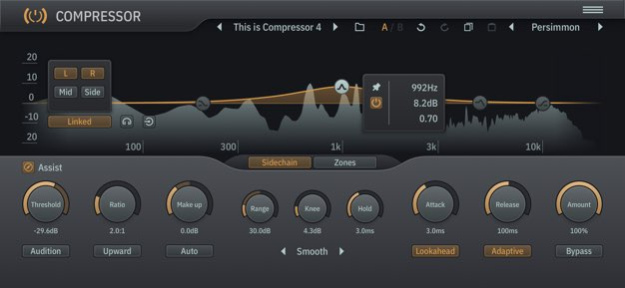
Say Hi! to your new favourite iOS compressor AUv3 plugin! ToneBoosters Compressor is an AUv3 plugin for professional, mastering-grade compression and dynamics processing. This flexible plug-in has all the features you will ever need, such as: - Soft knee compression - Parallel compression - Upward and downward compression - External side-chain input (if supported by the host) - Band-limited compression - Spatially selective compression This compressor is suitable for every compression task and beyond: - Track compression - Bus and master bus compression - De-essing and de-harshing using the band-limited compression feature The user interface shows compression in action, with a real-time and interactive display of levels, gains and curves. Assisted sliders provide guidance to accurately adjust threshold, makeup and range parameters. Want to hear what signal elements are affected by compression? Hit the audition button and listen to everything that is changed by the compressor in isolation. The side-chain editor allows you to adjust the frequency response of the side chain, and has an integrated spectrum analyzer. You can select which channels the side chain listens to, including selection of mid or side channels. Obviously we have provided an audition button for the side chain as well! Imagine you could just compress the mid or side channel, and apply compression to a specific frequency range only. Dynamically make space for elements without having to compress the full mix; de-ess those sibilant vocals in the mid channel; soothe those harsh frequencies; the possibilities are endless. This is all possible with the compression zone feature. The ToneBoosters Compressor app captures the microphone (or external sound card) input and processes the signals in real time. To use it as a plug-in, use an AUv3-compatible host app such as Steinberg Cubasis, Apple Garageband, Audio Evolution Mobile Studio, Auria, AUM, or others. ToneBoosters Compressor will appear in the list of Audio Unit extensions for effect plug-ins. Key features: - The same professional sound as the acclaimed desktop version - Ultra-low harmonic distortion, even with very short attack and release times (THD less than -100dB at 1kHz, depending on the selected compression mode) - Full-fledged side-chain equalizer - Audition function for compressor and side chain - Integrated spectrum analyzer for output and side chain - Variable release curve shape and release time - Upward and downward compression - Signal-adaptive release - Auto make up - Range parameter to limit the amount of compression - Dry/wet (amount) control for parallel compression - Zero latency (for live use) or lookahead mode (for studio use) - Interactive user interface with assisted sliders, curve and gain visualization - Undo/redo, and A/B comparison - Color themes for the user interface - Max screen support in Garageband - Optimised for iPad and compatible with iPhone and iPod Touch What you should know: - Licenses acquired for this platform are not compatible with other platforms. - Audio Unit (AUv3) extensions require an iPad mini 2, iPad 4 or later models.
Version History This update provides significant workflow, customisation, personalisation and performance improvements: - Improved UI performance and reduced CPU load - Improved detection of drag vs click/tap logic for UI elements - Fix an issue with manual entry of automation lane values in certain hosts - New option to enable/disable GPU refresh throttling / high frame rate rendering - New option to enable highlighting of UI elements that accept keyboard input - New option to customize color scheme - Improved undo/redo functionality - Add visual indicator of compression zone and side chain EQ enablement 4.7.8 May 30 Stability, efficiency, and compatibility improvements 4.7.4 10/05/2025 Efficiency and stability improvements Fixed some minor bugs 4.7.0 08/27/2024 - Stability and efficiency improvements - Significant reduction in memory consumption 4.6.7 06/06/2024 Stability and efficiency improvements 4.6.5 04/23/2024 Fixed a clipboard issue 4.6.4 04/04/2024 Efficiency and performance improvements 4.6.3 04/03/2024 UI, UX and efficiency improvements Harmonize version numbers with macOS versions 4.6.0 06/29/2023 - Improved UI rendering - New app icons - Inproved handling of key commands for copy/paste/undo/redo 1.5.1 01/04/2023 Optimizations for new iPad Mini Icon refresh 1.5.0 12/05/2021 Fixed an issue with the program manager in certain edge cases 1.4.8 08/16/2021 - Stand alone app: settings are stored when closing the app and retrieved when re-starting it - Various UI and preset manager improvements 1.4.7 08/15/2021 - Improved navigation through drop-down menus using mixed use of mouse, keyboard, pen, touch - New color schemes and various UI improvements - Improved UI refresh rates and performance - All-new program manager to save, load and organise programs - New upward compression mode 1.4.6 07/15/2021 Stand alone app can now set sample rate and frame size (latency) New color theme: Soil Various efficiency optimisations 1.4.3 03/23/2021 Efficiency and usability improvements 1.4.2 03/01/2021 New compression modes! 1.4.1 01/15/2021 - New upward compression mode! - Refreshed icon 1.4.0 01/07/2021 Stability and efficiency improvements 1.3.8 11/07/2020 - Improved spectrogram visualizer - iOS app and iOS AUv3 can now save default settings for new instances - iOS AUv3 can now export single programs and full program banks - iOS plugins can now reset to factory programs - New program manager to load, save, rename, delete, search and categorize user programs that are shared between IAA, stand alone and AUv3 instances - Improved support for soft bypass if supported by host program 1.3.7 09/23/2020 Improved UI rendering for tiny form factors (e.g. scaled UI in AUM) 1.3.6 08/24/2020 - UI improvements - Improved initialization upon start of playback and response to first audio events 1.3.5 08/19/2020 Improved initialization upon start of playback 1.3.4 08/14/2020 UI improvements 1.3.3 08/09/2020 - UI, usability, efficiency and stability improvements - Significantly improved sound quality for transient inputs and short attack times - Improved response to sampling rates other than 44.1 kHz 1.3.1 08/05/2020 Icon now contains name of app 1.2.2 07/06/2020
Previous Versions
Here you can find the changelog of TB Compressor since it was posted on our website on 2021-12-25 20:35:50.
The latest version is 4.7.8 and it was updated on 2026-10-10 10:35:50. See below the changes in each version.
TB Compressor version 4.7.8
Updated At: 2026-10-08
Changes: Version History This update provides significant workflow, customisation, personalisation and performance improvements:
- Improved UI performance and reduced CPU load
- Improved detection of drag vs click/tap logic for UI elements
- Fix an issue with manual entry of automation lane values in certain hosts
- New option to enable/disable GPU refresh throttling / high frame rate rendering
- New option to enable highlighting of UI elements that accept keyboard input
- New option to customize color scheme
- Improved undo/redo functionality
- Add visual indicator of compression zone and side chain EQ enablement 4.7.8 May 30 Stability, efficiency, and compatibility improvements 4.7.4 10/05/2025 Efficiency and stability improvements
Fixed some minor bugs 4.7.0 08/27/2024 - Stability and efficiency improvements
- Significant reduction in memory consumption 4.6.7 06/06/2024 Stability and efficiency improvements 4.6.5 04/23/2024 Fixed a clipboard issue 4.6.4 04/04/2024 Efficiency and performance improvements 4.6.3 04/03/2024 UI, UX and efficiency improvements
Harmonize version numbers with macOS versions 4.6.0 06/29/2023 - Improved UI rendering
- New app icons
- Inproved handling of key commands for copy/paste/undo/redo 1.5.1 01/04/2023 Optimizations for new iPad Mini
Icon refresh 1.5.0 12/05/2021 Fixed an issue with the program manager in certain edge cases 1.4.8 08/16/2021 - Stand alone app: settings are stored when closing the app and retrieved when re-starting it
- Various UI and preset manager improvements 1.4.7 08/15/2021 - Improved navigation through drop-down menus using mixed use of mouse, keyboard, pen, touch
- New color schemes and various UI improvements
- Improved UI refresh rates and performance
- All-new program manager to save, load and organise programs
- New upward compression mode 1.4.6 07/15/2021 Stand alone app can now set sample rate and frame size (latency)
New color theme: Soil
Various efficiency optimisations 1.4.3 03/23/2021 Efficiency and usability improvements 1.4.2 03/01/2021 New compression modes! 1.4.1 01/15/2021 - New upward compression mode!
- Refreshed icon 1.4.0 01/07/2021 Stability and efficiency improvements 1.3.8 11/07/2020 - Improved spectrogram visualizer
- iOS app and iOS AUv3 can now save default settings for new instances
- iOS AUv3 can now export single programs and full program banks
- iOS plugins can now reset to factory programs
- New program manager to load, save, rename, delete, search and categorize user programs that are shared between IAA, stand alone and AUv3 instances
- Improved support for soft bypass if supported by host program 1.3.7 09/23/2020 Improved UI rendering for tiny form factors (e.g. scaled UI in AUM) 1.3.6 08/24/2020 - UI improvements
- Improved initialization upon start of playback and response to first audio events 1.3.5 08/19/2020 Improved initialization upon start of playback 1.3.4 08/14/2020 UI improvements 1.3.3 08/09/2020 - UI, usability, efficiency and stability improvements
- Significantly improved sound quality for transient inputs and short attack times
- Improved response to sampling rates other than 44.1 kHz 1.3.1 08/05/2020 Icon now contains name of app 1.2.2 07/06/2020
TB Compressor version 4.7.4
Updated At: 2026-05-28
Changes: Version History Stability, efficiency, and compatibility improvements 4.7.4 10/05/2025 Efficiency and stability improvements
Fixed some minor bugs 4.7.0 08/27/2024 - Stability and efficiency improvements
- Significant reduction in memory consumption 4.6.7 06/06/2024 Stability and efficiency improvements 4.6.5 04/23/2024 Fixed a clipboard issue 4.6.4 04/04/2024 Efficiency and performance improvements 4.6.3 04/03/2024 UI, UX and efficiency improvements
Harmonize version numbers with macOS versions 4.6.0 06/29/2023 - Improved UI rendering
- New app icons
- Inproved handling of key commands for copy/paste/undo/redo 1.5.1 01/04/2023 Optimizations for new iPad Mini
Icon refresh 1.5.0 12/05/2021 Fixed an issue with the program manager in certain edge cases 1.4.8 08/16/2021 - Stand alone app: settings are stored when closing the app and retrieved when re-starting it
- Various UI and preset manager improvements 1.4.7 08/15/2021 - Improved navigation through drop-down menus using mixed use of mouse, keyboard, pen, touch
- New color schemes and various UI improvements
- Improved UI refresh rates and performance
- All-new program manager to save, load and organise programs
- New upward compression mode 1.4.6 07/15/2021 Stand alone app can now set sample rate and frame size (latency)
New color theme: Soil
Various efficiency optimisations 1.4.3 03/23/2021 Efficiency and usability improvements 1.4.2 03/01/2021 New compression modes! 1.4.1 01/15/2021 - New upward compression mode!
- Refreshed icon 1.4.0 01/07/2021 Stability and efficiency improvements 1.3.8 11/07/2020 - Improved spectrogram visualizer
- iOS app and iOS AUv3 can now save default settings for new instances
- iOS AUv3 can now export single programs and full program banks
- iOS plugins can now reset to factory programs
- New program manager to load, save, rename, delete, search and categorize user programs that are shared between IAA, stand alone and AUv3 instances
- Improved support for soft bypass if supported by host program 1.3.7 09/23/2020 Improved UI rendering for tiny form factors (e.g. scaled UI in AUM) 1.3.6 08/24/2020 - UI improvements
- Improved initialization upon start of playback and response to first audio events 1.3.5 08/19/2020 Improved initialization upon start of playback 1.3.4 08/14/2020 UI improvements 1.3.3 08/09/2020 - UI, usability, efficiency and stability improvements
- Significantly improved sound quality for transient inputs and short attack times
- Improved response to sampling rates other than 44.1 kHz 1.3.1 08/05/2020 Icon now contains name of app 1.2.2 07/06/2020 App icon refresh 1.2.1 07/05/2020
TB Compressor version 4.7.4
Updated At: 2025-10-05
Changes: Stability, efficiency, and compatibility improvements
TB Compressor version 4.7.0
Updated At: 2024-08-27
Changes: Aug 27, 2024
Version 4.7.0
Efficiency and stability improvements
Fixed some minor bugs
TB Compressor version 4.6.7
Updated At: 2024-06-06
Changes: Jun 6, 2024
Version 4.6.7
- Stability and efficiency improvements
- Significant reduction in memory consumption
TB Compressor version 4.6.5
Updated At: 2024-04-23
Changes: Apr 23, 2024
Version 4.6.5
Stability and efficiency improvements
TB Compressor version 4.6.4
Updated At: 2024-04-04
Changes: Apr 4, 2024
Version 4.6.4
Fixed a clipboard issue
TB Compressor version 4.6.0
Updated At: 2023-06-29
Changes: Jun 29, 2023
Version 4.6.0
UI, UX and efficiency improvements
Harmonize version numbers with macOS versions
TB Compressor version 1.5.1
Updated At: 2023-01-04
Changes: Jan 4, 2023
Version 1.5.1
- Improved UI rendering
- New app icons
- Inproved handling of key commands for copy/paste/undo/redo
TB Compressor version 1.5.0
Updated At: 2021-12-05
Changes: Dec 5, 2021 Version 1.5.0
Optimizations for new iPad Mini
Icon refresh
Disclaimer
Official App Store Link
We do not host TB Compressor on our servers. We did not scan it for viruses, adware, spyware or other type of malware. This app is hosted by Apple and passed their terms and conditions to be listed there. We recommend caution when installing it.
The App Store link for TB Compressor is provided to you by apps112.com without any warranties, representations or guarantees of any kind, so access it at your own risk.
If you have questions regarding this particular app contact the publisher directly. For questions about the functionalities of apps112.com contact us.